The trouble with Apple ID.

An associates told us about the trouble with his Apple ID for the past 24 hours. He was unable to log-on to any Apple services that requires Apple ID such as iTunes Store, iCloud and most importantly Apple Developer site.
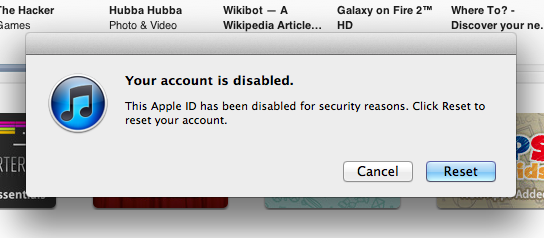
He said that he was able to reset the password through iforgot.apple.com, but a minute later the account was disabled again. So he contacted Apple and had them investigated if there were any suspicious activities on his account. So far they found no suspicious activities  on iTunes Store and iCloud.

Some tips for account security:

  • Have a good password, generally minimum of 8 characters including numbers, characters, lower case and uppercase alphabets.
  • Good security question that is not easily guessable.
  • Know what your alternate emails are.

Example of bad security question and answer:

Q: What is the name of my first high school.
A: Polk High

Your high school friends know this fact. Unless you’re completely lying on the answer.

Preparing for OS X Mountain Lion Installation.

Apple has just announced the availability of OS X Mountain Lion Developer Preview. For those who are eager to download and install this Developer Preview should proceed with caution. Without breaking any NDA’s we can safely assume:

  1. It comes with delicious bugs and incomplete features.
  2. It is not ready as your production machine.
  3. Some of the applications might not work.

If you want to install OS X Mountain Lion Developer Preview, you might want to consider the following steps:

  • Do not upgrade any of your Snow Leopard or Lion systems. Starting with fresh install is preferable.
  • Use a dedicated hard drive for Mountain Lion installation.
  • Create the OS X Mountain Lion installation media using DVD or USB flash drive from the InstallESD.dmg (Show Package Contents on “Install OS X Mountain Lion Preview 1” then go to “ContentsShared Support”).

Don’t forget to report any bugs you find to Apple at http://bugreporter.apple.com/.

SMS Spam: 502-4562-0820

Yet another SMS spam. This one reads:

“FELICIDADES” IUSACEL, Te Inf. Gracias a tu Mòvil eres Ganador : US$ 45,000 Y 1 TOYOTA PRADO 2012 ” Gracias ” A : HONDUTEL Mayor info. PBX: 01150242582314.

Google translates it as:

“CONGRATULATIONS” IUSACEL, Information Thank you for your cell phone you are Winner: U.S. $ 45.000 and 1 TOYOTA PRADO 2012 “Thank you” A: HONDUTEL More Info. PBX: 01150242582314.

I’m assuming that it comes from Honduras.

Victim of MySQL Injection.

In the morning of February 10th, 2012 I received a frantic phone call from a client; their site was compromised. So I spent good portions of Friday and Saturday cleaning up a site that was hacked through MySQL injection. I found out that the hack came through an old installation of WordPress 2.1.4.

So far, so good. I’ll be watching the site for any suspicious activities.

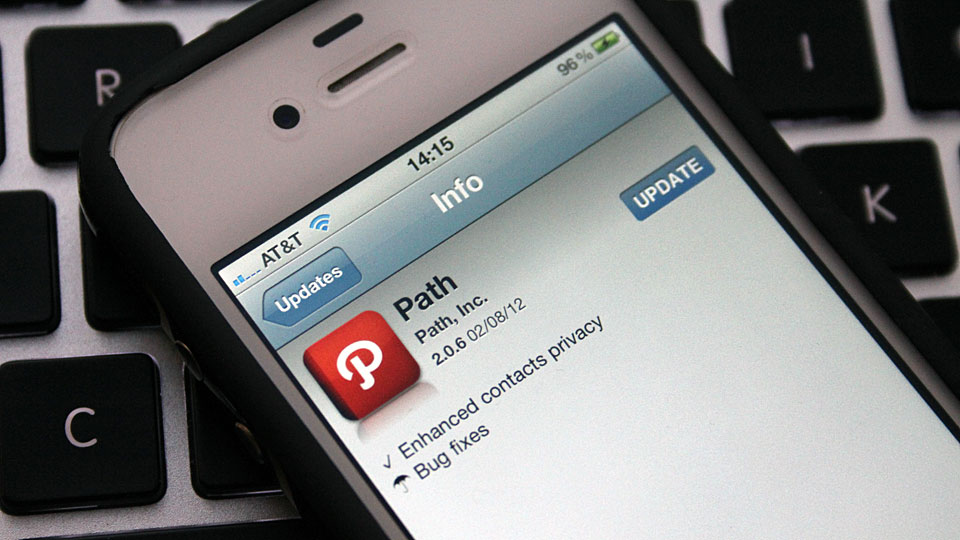
Path updates iOS App, address book upload is now opt-in.

The headline: Path Uploads Your Entire iPhone Address Book to Its Servers

Path‘s response: We are sorry

We made a mistake. Over the last couple of days users brought to light an issue concerning how we handle your personal information on Path, specifically the transmission and storage of your phone contacts.

…….

In Path 2.0.6, released to the App Store today, you are prompted to opt in or out of sharing your phone’s contacts with our servers in order to find your friends and family on Path. If you accept and later decide you would like to revoke this access, please send an email to service@path.com and we will promptly see to it that your contact information is removed.

Path iOS App version 2.0.6 now warns users before uploading the content of Address Book.

That’s a proper response from Path.

Goodbye Path, for now.

The headline: Path Uploads Your Entire iPhone Address Book to Its Servers

The reactions: Delete Path from iPhone (iOS device)

Email service@path.com and request to delete your Address Book data from Path servers.

Hi (First Name of Path User),

Thanks for getting in touch with us! I have erased your contacts and their information from our servers.

On behalf of the team, I’d like to apologize for any privacy concerns that you may have had. Our current release of Path for Android requests permission to access your address book. In the next iOS release, we will have this same permission request added.

Until the update is released for iOS, selecting “Add Friends” will display the names of contacts that you have stored on your phone. But now that you’ve opted out of contact uploading, we will never re-store this data on our servers.

Please let me know if there is anything else I can do to help you. I’m more than happy to address any further questions or concerns that you may have.

Best,
(First Name of Path Service Personnel)

That’s simple enough.