A television remote control does leave an impression.


Celebrating 20 years of Nonsense, Powered by Natural Intelligence.
A television remote control does leave an impression.
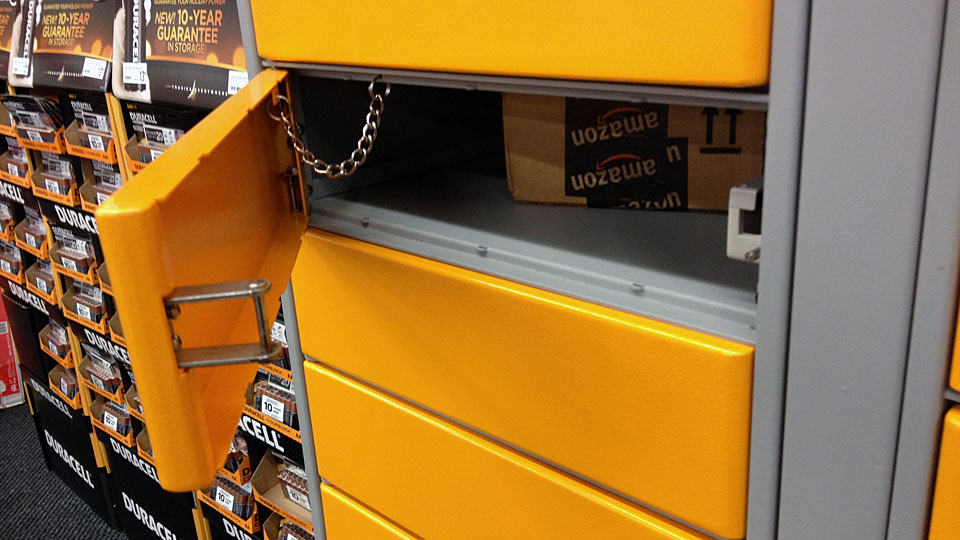
I decided to have one of my orders delivered to Amazon Locker. As soon as the delivery was confirmed, I headed out to the Amazon Locker location that I had chosen when I placed my order. I arrived at Staples and proceeded tot he Amazon Locker area behind the check-stands. Then I realized that I needed the unique pick-up code which I never received. I called Amazon.com and have the customer service representative to re-send the code. Soon after, I entered the code and one of the locker opened with my order inside. I certainly would use Amazon Locker again whenever necessary. Using Amazon Locker definitely reduce the anxiety of waiting for the package on the delivery day. There’s no need to make sure anyone home to sign for delivery. I can have the package delivered to Amazon Locker nearest to the office.


Red and green wires wrapped around iron cores, I should have used this for Christmas.

Retouching photo using Adobe Photoshop.

Taken using Canon EOS 60D
Aperture: f/5
Exposure: 1/3 seconds
ISO 3200
Lighting condition was poor, and I had to keep my hands steady.

First I adjusted the color and contrast. I soften the background and foreground, keeping the focus on Unicorn T. Kitten.

After a few days of erroneous suspension, my personal blog was unsuspended by WordPress.com.
Hi there,
Thank you for getting in touch.
Your site was flagged by our automated anti-spam controls. We have reviewed your site and have removed the suspension notice.
We greatly apologize for this error and any inconvenience it may have caused.
—
Ryan M.
WordPress.com | Automattic
I personally am relieved. I’d like to thank Ryan M., WordPress.com and Automattic for clearing up this issue.

https://plus.google.com/u/1/downgrade/
Chain of Credits:
Rob Griffiths as featured by the bearded one (Jim Dalrymple)
There’s no need to have Google+ just because you have a Gmail account.

We had a request from someone to stop AirPort Express broadcasting the SSID, for security purpose.
Hiding Wireless network SSID does not really enhance security.
Unfortunately, this tactic may lead to a false sense of security, as it only impedes casual wireless snooping, and does not stop a determined attack on the network.
There are numerous of tools that can scan any hidden SSID.
Just in case anyone still want to hide their AirPort Express or AirPort Extreme SSID:
In AirPort Utility, go to “Wireless” and click on “Wireless Options…”

Check the box for “Create hidden network”
