Panasonic HDC-SD9: The Answer Lies Within QuickTime 7.5

For the past few months, Panasonic HDC-SD9 owners have not been able to import videos from Panasonic HDC-SD9 correctly. The temporary solutions for Final Cut Pro 6.0.3 users was to install Perian 1.1 plugin.


AVCHD

With the release of QuickTime 7.5, Panasonic HDC-SD9 videos can now be imported using iMovie ’08, Final Cut Express 4, and Final Cut Pro 6.

It is recommended to update all the applications to the latest versions. QuickTime 7.5 is the most critical component to make this work.

I can only confirm this on the North American version of Panasonic HDC-SD9 (with 24p Cinema Mode). The European version (with 25p Cinema Mode) theoretically should now work with the Mac.

UPDATE:

Hans Eklundh left a comment and confirmed that the 25p PAL version (Europe) also works with QuickTime 7.5
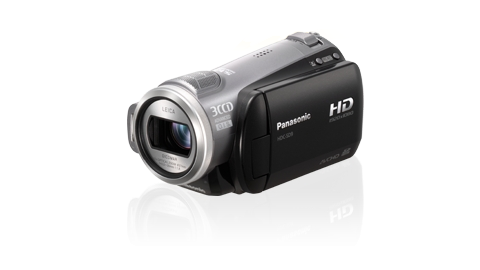
Panasonic HDC-SD9 AVCHD Camcorder

Test results using 15-inch MacBook Pro Core Duo 2GHz 2GB RAM:

Mac OS X 10.4.11

QuickTime 7.4.5
iMovie 7.1
HA1920 24p – Video is faster than Audio
HA1920 – Crash during imports

QuickTime 7.5
iMovie 7.1
HA1920 24p – Video imported successfully; 37s -> 36s
HA1920 – Video imported successfully; 38s -> 38s

QuickTime 7.5
iMovie 7.1.2
HA1920 24p – Video imported successfully; 37s -> 37s
HA1920 – Video imported successfully; 38s -> 38s

Mac OS X 10.5.3

QuickTime 7.5
iMovie 7.1.1
HA1920 24p – Video imported successfully; 37s -> 36s
HA1920 – Video imported successfully; 38s -> 38s

QuickTime 7.5
iMovie 7.1.2
HA1920 24p – Video imported successfully; 37s -> 36s
HA1920 – Video imported successfully; 38s -> 38s

Get QuickTime 7.5 and iMovie 7.1.2 updates from Apple Software Update or through the Downloads site.


Panasonic HDC-SD9: Playing nice with iMovie 7.1.2

UPDATE:
It seems that QuickTime 7.5 update adds the compatibilities between Panasonic HDC-SD9 and iMovie ’08, Final Cut Express 4, and Final Cut Pro 6.

UPDATE:
Thanks to James and Hans Eklundh for confirming that QuickTime 7.5 now supports PAL/European HDC-SD9.

Immediately after applying iMovie 7.1.2 update, I recorded a number of videos on Panasonic HDC-SD9.

  • HA1920
  • HA1920 24p
  • HG1920

I managed to import the videos without any problems at all, and the audio is in sync with the video. Previously, iMovie ’08 was unable to import the video from Panasonic HDC-SD9 correctly. It crashes during HA1920 import. The HA1920 24p video was playing faster than the audio track.

I am doing more testing on this issue, and will post the result as soon as possible.

The gears:

  • Panasonic HDC-SD9
  • 15-inch MacBook Pro Core Duo 2.0GHz 2GB
  • iMovie 7.1.2
  • QuickTime 7.5
  • Mac OS X 10.5.3

Stay tuned.

Apple posts iDVD 7.0.2 and iMovie 7.1.2

Following WWDC 2008 Keynote and QuickTime 7.5, Apple post updates to iDVD ’08 and iMovie ’08 today.

06/10/2008

iDVD 7.0.220.27MB
This update supports general compatibility issues, improves overall stability, and addresses a number of other minor issues.

iMovie 7.1.217.9MB
This update addresses general compatibility issues, improves overall stability, and addresses a number of other minor issues.

I want to know if Apple would add supports for newer AVCHD camcorders such as Panasonic HDC-SD9 which I own.

UPDATE:
I can now import videos from Panasonic HDC-SD9 using iMovie 7.1.2 and QuickTime 7.5 installed. I still have Perian 1.1 installed on computer. I will do more testing on this.

Apple Posts QuickTime 7.5

Apple posts QuickTime 7.5 on its website today. It is also available through Apple Software Update on Windows. For some reasons, the update does not appear on my MacBook Pro running Mac OS X Leopard.

Get QuickTime 7.5

Available for Mac OS X Panther (10.3.9), Tiger (10.4.11), and Leopard (10.5.3). Also available for Windows XP and Vista.

Mac OS X Snow Leopard on Apple.com

Apple has published Mac OS X Snow Leopard on its website.

There’s no mention of the version of Mac OS X Snow Leopard yet. It might not be version 10.4.6 as of now yet.

Mac OS X Snow Leopard features:

  • Microsoft Exchange Support
    Snow Leopard includes out-of-the-box support for Microsoft Exchange 2007 built into Mail, Address Book, and iCal.
  • Multicore
    “Grand Central,” a new set of technologies built into Snow Leopard, brings unrivaled support for multicore systems to Mac OS X.
  • 64-bit
    To accommodate the enormous amounts of memory being added to advanced hardware, Snow Leopard extends the 64-bit technology in Mac OS X to support breakthrough amounts of RAM — up to a theoretical 16TB, or 500 times more than what is possible today
  • Media and Internet
    Using media technology pioneered in OS X iPhone, Snow Leopard introduces QuickTime X, a streamlined, next-generation platform that advances modern media and Internet standards.
  • OpenCL
    Another powerful Snow Leopard technology, OpenCL (Open Compute Library), makes it possible for developers to efficiently tap the vast gigaflops of computing power currently locked up in the graphics processing unit (GPU).

http://www.apple.com/macosx/snowleopard/