iPad 3 and Smart Cover.

For the purpose of this post, let’s call the next iPad by the name “iPad 3“.

It makes a lot of sense that Apple would release iPad 3 in March/April timeframe since the first one hit the street on April 3rd, 2010 and the second one on March 11th, 2011. In December 2011, my ever-reliable source told me “the next iPad is coming March 2012”. I mentioned this back on December 9th, 2011.

What I learned then about iPad 3 is the followings:

  • Don’t call it an iPad with Retina Display.
  • It’s worth waiting for the iPad 3, if I were to get one in December 2011.
  • It’s compatible with the existing Smart Cover.

Existing Smart Cover?

Think of iPad 3 to iPad 2 as iPhone 3GS to iPhone 3G. Just like iPhone 4S to iPhone 4.

There were no mentions of the shape or thickness of iPad 3 back shell. I assume the back would be different and the glass front would be physically the same.

p.s. Check back Wednesday February 22nd, 2012. I have a meeting with a little birdie who knows a lot about Apple.
 

The trouble with Apple ID.

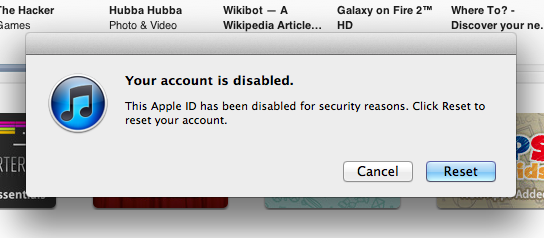
An associates told us about the trouble with his Apple ID for the past 24 hours. He was unable to log-on to any Apple services that requires Apple ID such as iTunes Store, iCloud and most importantly Apple Developer site.

He said that he was able to reset the password through iforgot.apple.com, but a minute later the account was disabled again. So he contacted Apple and had them investigated if there were any suspicious activities on his account. So far they found no suspicious activities  on iTunes Store and iCloud.

Some tips for account security:

  • Have a good password, generally minimum of 8 characters including numbers, characters, lower case and uppercase alphabets.
  • Good security question that is not easily guessable.
  • Know what your alternate emails are.

Example of bad security question and answer:

Q: What is the name of my first high school.
A: Polk High

Your high school friends know this fact. Unless you’re completely lying on the answer.

This kind of day.

One of the hard drives in a Windows Home Server has gone bad. I’m working to get it replaced. Actually I want to get a new file server.

Preparing for OS X Mountain Lion Installation.

Apple has just announced the availability of OS X Mountain Lion Developer Preview. For those who are eager to download and install this Developer Preview should proceed with caution. Without breaking any NDA’s we can safely assume:

  1. It comes with delicious bugs and incomplete features.
  2. It is not ready as your production machine.
  3. Some of the applications might not work.

If you want to install OS X Mountain Lion Developer Preview, you might want to consider the following steps:

  • Do not upgrade any of your Snow Leopard or Lion systems. Starting with fresh install is preferable.
  • Use a dedicated hard drive for Mountain Lion installation.
  • Create the OS X Mountain Lion installation media using DVD or USB flash drive from the InstallESD.dmg (Show Package Contents on “Install OS X Mountain Lion Preview 1” then go to “ContentsShared Support”).

Don’t forget to report any bugs you find to Apple at http://bugreporter.apple.com/.